Banner
A banner displays an important, succinct message, and provides actions for users to address (or dismiss the banner). A user action is required for it to be dismissed.
Banners are displayed at the top of the screen, below a top app bar. They are persistent and non-modal, allowing the user to either ignore them or interact with them at any time.
To open this control, simply call the page.open() helper-method.
Examples
Banner with leading icon and actions
loading...
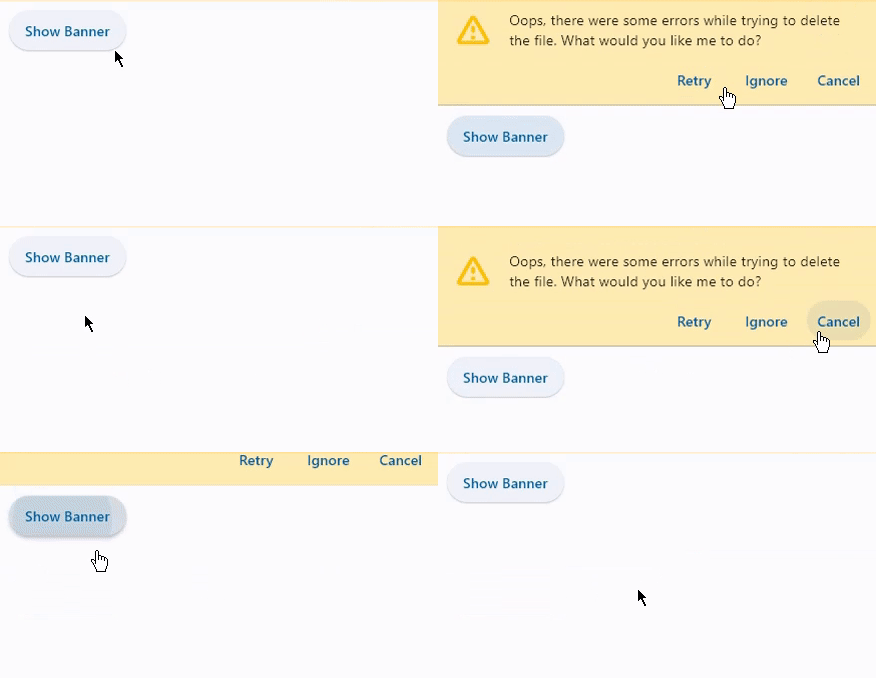
Properties
actions
The set of actions that are displayed at the bottom or trailing side of the Banner.
Typically this is a list of TextButton controls.
bgcolor
The color of the surface of this Banner.
content
The content of the Banner.
Typically a Text control.
content_padding
The amount of space by which to inset the content.
The value is an instance of padding.Padding class or a number.
If the actions are below the content, this defaults to padding.only(left=16.0, top=24.0, right=16.0, bottom=4.0).
If the actions are trailing the content, this defaults to padding.only(left=16.0, top=2.0).
content_text_style
The style to be used for the Text controls in the content.
Value is of type TextStyle.
divider_color
The color of the divider.
elevation
The elevation of the banner.
force_actions_below
An override to force the actions to be below the content regardless of how many there are.
If this is True, the actions will be placed below the content. If this is False, the actions will be placed on the
trailing side of the content if actions length is 1 and below the content if greater than 1.
Defaults to False.
leading
The (optional) leading Control of the Banner.
Typically an Icon control.
leading_padding
The amount of space by which to inset the leading control.
The value is an instance of padding.Padding class or a number.
Defaults to 16 virtual pixels.
margin
The amount of space surrounding the banner.
The value is an instance of Margin class or a number.
min_action_bar_height
The optional minimum action bar height.
Defaults to 52.
open
Set to True to display a banner.
shadow_color
The color of the shadow below the banner.
surface_tint_color
The color used as an overlay on bgcolor to indicate elevation.
Events
on_visible
Fires when the banner is shown or made visible for the first time.